
Famio: Connect With Family
GismartLifestyle
3.61.40K Reviews
- Version
- 1.43.2
- Installs
- 10.00M
- Age Rating
- Everyone
Screenshots

Our Review of Famio: Connect With Family
 Analysis by Appyee
When my family’s plans are spread across texts, calls, and half-remembered conversations, the hard part isn’t caring about one another; it’s knowing what’s happening without chasing everyone for updates. Famio: Connect With Family is designed to bring family coordination and safety tools together, so I looked at it as a shared place to check in rather than another social feed. That distinction matters: it is most useful when relatives agree to use it, and less useful if everyone expects a different app to be the one place for plans.
Getting Started and Building a Family Routine
Downloading Famio was a no-brainer. It’s available on both Android and iOS, so no one in the fam gets left out. Once installed, the setup was pretty straightforward. You just need to create an account, and you’re all set to invite your family members. The user interface is clean and intuitive, which is a relief because, let's be real, nobody wants to fumble through an app when they're trying to keep track of their loved ones.
Before inviting everyone, I’d decide what the family actually wants to coordinate. If the goal is mainly getting a quick “I’m here” update, location sharing may be the main draw. If plans and household jobs are the daily headache, the calendar and task manager are more relevant. Starting with one shared routine makes it easier to see whether a family hub helps, rather than asking relatives to move every conversation and reminder into a new place at once.
Famio is a free lifestyle app from Gismart, with a 3.6 average from around 110,000 ratings and more than 10 million installs. It is rated for Everyone, and its current version is 1.43.2, with Android 11 as the minimum OS. Those figures suggest a widely used product, but I would not treat popularity as proof that it suits every household: the deciding factor is whether the people you want to coordinate will participate consistently.
Features That Make Life Easier
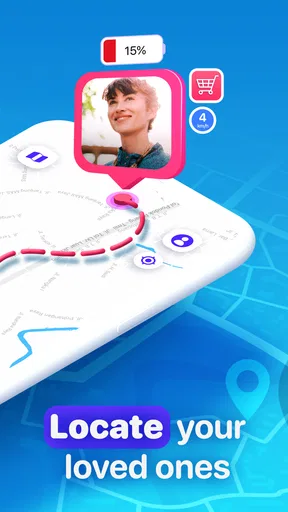
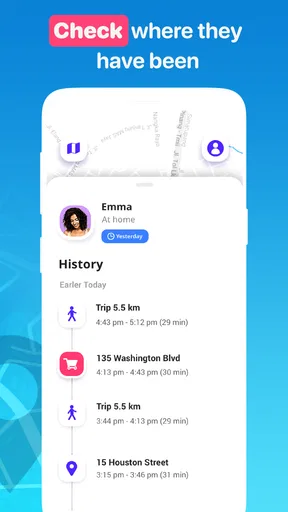
One of the first things I noticed was the location sharing feature. With a tap, you can see where everyone is. It’s like having a family GPS, which is perfect if you have teenagers or worry about elderly parents. And don't worry—privacy settings are solid, so you can choose who sees what.
For everyday use, I’d make location sharing purposeful rather than a reason to check the map constantly. A parent waiting for a teenager to arrive after an activity, for example, may find a shared location more practical than sending repeated “where are you?” messages. It works best when family members understand who can see their location and why. That conversation is part of setting up the tool, not a detail to leave until someone feels watched.
Another nifty feature is the shared calendar. I mean, how many times have you missed a family event because you forgot to put it on your calendar? With Famio, everyone can add events, and you get reminders. It's like having a personal assistant for family affairs.
A shared calendar is especially useful when plans involve a handoff. One person can add a school event or appointment, while another checks the same schedule before arranging a ride or meal. To keep it readable, I’d use clear event names and include the practical detail people need to act on, rather than treating it as a place to record every thought. If relatives already rely on separate calendars, the family still needs an agreed habit for checking this one; otherwise, a reminder in Famio may not reach the person who needs it.
The messaging feature is also noteworthy. Sure, we have other messaging apps, but having everything in one place is super convenient. Plus, there are fun stickers and emojis to keep conversations lively. And if you’re the kind of person who loves lists, you’ll appreciate the task manager that lets you assign chores or errands to family members.
The useful trade-off here is consolidation versus habit. If a family is already comfortable with a group chat, moving every casual conversation may feel like extra work. I’d use Famio’s messages for coordination tied to family plans and keep expectations simple: a task assignment is only helpful if the assigned person knows to look for it. For errands, making the job specific and assigning it to one person is more actionable than leaving a vague household list that everyone assumes somebody else will handle.
Staying Safe and Connected
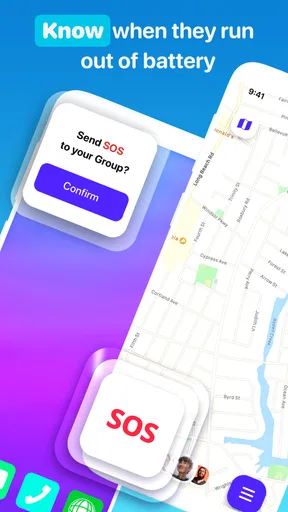
Safety is a big deal, especially if you have kids. Famio includes an SOS button that sends an alert with your location to your family. It’s reassuring to know that help is just a tap away if you need it.
An emergency shortcut is valuable only if people know what happens when it is used. I’d make sure family members understand who receives the alert and agree on how to respond, instead of assuming the button itself creates a safety plan. It can support communication in an urgent moment, but it is not a replacement for contacting local emergency services when that is necessary.
Additionally, the app provides driving reports. This feature is particularly useful for parents with young drivers in the family. You can monitor driving habits and ensure everyone is staying safe on the road.
Driving reports can open a conversation, but they should not become the only measure of whether someone is driving responsibly. A parent and a new driver may interpret monitoring differently, so it helps to talk through its purpose and boundaries before relying on it. If the family wants only occasional updates, a straightforward check-in may feel less intrusive; if everyone welcomes a shared safety routine, the reports can be more relevant.
Where the Routine Can Break Down
Now, no app is perfect, and Famio is no exception. While the basic features are free, there are premium options that require a subscription. If you want the extra bells and whistles, you might have to shell out a few bucks. But honestly, the free version covers most of what you’d need for daily family management.
Famio is free to download, while in-app purchases range from $4.99 to $79.99 per item. I’d try the everyday workflow before paying for anything: invite the relatives who will actually use it, test whether the calendar and messages fit your routine, and decide whether the included tools solve a real problem. A paid option is easier to judge when you know which specific need it addresses, rather than buying on the assumption that every household will benefit from extra features.
One thing I noticed is that the location updates can occasionally lag. It’s not a deal-breaker, but it’s something to be aware of. Also, the app can drain your battery if you’re using location services constantly, so keep an eye on that.
That limitation changes how I’d use the map: I wouldn’t rely on it as a live, second-by-second view or as the sole way to confirm that someone has arrived safely. A direct call or message is the better fallback when timing matters. Frequent location use can also be a poor fit for someone already managing a low battery, so families should weigh the convenience against how often they need location information instead of leaving it on by default without a clear reason.
How It Fits Among Family Tools
Compared with the usual mix of a messaging app, individual calendars, and location sharing, Famio’s main appeal is having several family-oriented tools in one place. That can reduce the number of places to check when a plan changes. The trade-off is that dedicated alternatives may already be deeply woven into a household’s routine. If everyone reliably uses a group chat and a shared calendar, Famio may duplicate that setup rather than simplify it.
I see it as a stronger fit for families who want location sharing, household coordination, and safety-related tools together, especially when several relatives need to stay in the loop. It is a weaker fit for someone who wants only a private calendar, a basic checklist, or occasional messaging; those needs may be easier to handle with a familiar single-purpose tool. It also may not suit relatives who do not want their location shared or who are unlikely to open another app, since the benefits depend on participation and shared expectations.
A realistic routine might look like this: a parent adds an afternoon activity to the calendar, another family member checks it before planning a pickup, and the teenager uses location sharing to let the family see the journey. If the plan changes, a message can carry the update, while a task can clarify who is handling the next errand. The value is not that every step is automatic; it is that the family can pass information from one person to another without rebuilding the plan from scattered messages.
Final Thoughts
Overall, Famio: Connect With Family is a solid app for anyone looking to streamline family communication and safety. It’s user-friendly, packed with useful features, and offers peace of mind knowing you’re connected to your loved ones. Whether you’re coordinating family events or just making sure everyone’s safe, Famio has got you covered.
If your family is as scattered and busy as mine, I’d definitely recommend giving Famio a try. It might just be the tool you need to keep everyone connected without all the hassle.
My practical recommendation is to begin with one shared use—such as coordinating pickups or keeping family appointments visible—and see whether it reduces back-and-forth. Then decide whether the other tools earn a place in your routine. If relatives are comfortable with the arrangement and remember to check the app, it can become a convenient family hub. If they prefer existing tools, or if location sharing would create more tension than reassurance, there is no need to force the switch.
Verdict
Strengths of Famio: Connect With Family
- User-friendly interface for easy navigation.
- Real-time location tracking enhances safety.
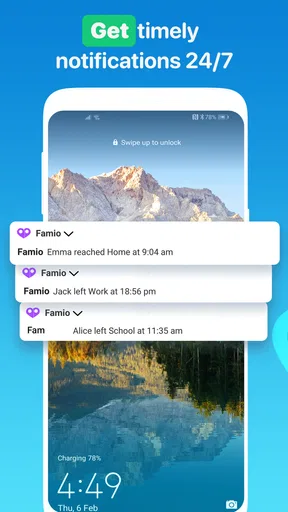
- Customizable alerts for family updates.
- Cross-platform support for Android and iOS.
- Secure data privacy with encryption.
Limitations of Famio: Connect With Family
- Requires constant internet connection.
- Battery drain due to GPS usage.
- Subscription needed for premium features.
- Limited features in free version.
- Occasional lag in location updates.
Other Releases by Gismart
View All
Piano - Music Keyboard & Tiles
Music4.1

Real Guitar - Music Band Game
Music3.1

Drum Pads - Beat Maker Go
Music & Audio3.0

VIP Guard
Arcade4.7
Similar Picks in This Category
View All
SmartThings
Samsung Electronics Co., Ltd.4.6

Google Home
Google LLC4.0

Pinterest4.2

Astrotalk - Talk to Astrologer
Astrology & Horoscope4.7

My Verizon
Verizon Consumer Group4.5

Samsung Wallet (Samsung Pay)
Samsung Electronics Co., Ltd.4.1
Frequently Asked Questions
What is Famio: Connect With Family, and how does it work?
Famio: Connect With Family is a versatile app designed to keep families connected. It offers features like location sharing, task management, and a shared calendar. Users can easily track each other's locations, assign tasks, and schedule family events. The app aims to enhance communication and coordination within families.
Is Famio safe to use for sharing personal information?
Yes, Famio prioritizes user privacy and security. It uses advanced encryption to protect personal data, ensuring that location and other sensitive information are shared only among family members. The app also provides customizable privacy settings, so users have control over what information they share and with whom.
What devices and operating systems support Famio?
Famio is available for both Android and iOS devices. It supports a wide range of smartphones and tablets, ensuring compatibility with most modern devices. Users can download Famio from the Google Play Store for Android devices and the Apple App Store for iOS devices, making it accessible to all family members.
Does Famio require a subscription or is it free to use?
Famio offers a free version with essential features for connecting with family. However, to access premium features like advanced location tracking and additional customization options, users may need to subscribe to a paid plan. This subscription enhances the app's functionality and provides a more comprehensive family management experience.
Can Famio be used for families of all sizes?
Absolutely, Famio is designed to accommodate families of any size. Whether you have a small or a large family, the app allows you to add multiple members and organize them into groups for easier management. The app’s flexibility makes it a suitable choice for diverse family structures, ensuring everyone stays connected.
